agentmarkup makes your website understandable by LLMs and AI agents. It generates llms.txt and optional llms-full.txt files, injects schema.org JSON-LD, can generate markdown mirrors from final HTML when raw pages are thin or noisy, manages AI crawler robots.txt rules, patches _headers with Content-Signal directives, and validates the final output at build time. Same config, same features, whether you use Vite or Astro.
llms.txt generation
Auto-generate an llms.txt file following the llmstxt.org spec, inject the homepage discovery link automatically, and optionally emit llms-full.txt with inlined same-site markdown context.
JSON-LD structured data
Inject schema.org JSON-LD into every page with XSS-safe serialization. Use 6 built-in presets for common types or bring your own custom schemas.
AI crawler management
Allow or block AI crawlers like GPTBot, ClaudeBot, PerplexityBot, Google-Extended, and CCBot with idempotent robots.txt patching that will not break your existing rules.
Markdown mirrors
Optionally generate a clean .md companion for built HTML pages when fetch-based agents need a better path than the raw HTML. Useful for thin or noisy output. If your HTML already ships substantial content, keep HTML as the primary fetch target. Read when mirrors help and when they do not.
Content-Signal headers
Patch or generate a host-friendly _headers file with Content-Signal directives for platforms like Cloudflare Pages and Netlify.
Final-output validation
Catch missing required fields, incomplete schema.org schemas, thin client-shell HTML, broken markdown alternate links, missing llms mirror coverage, AI crawler conflicts, and malformed llms files before you deploy.
Check your website before you ship it
Run the built-in website checker to inspect any public homepage for llms.txt, JSON-LD, markdown mirrors, robots.txt, sitemap discovery, canonical tags, and thin-HTML issues. It follows at most one same-origin link, does not invent a score, and tells you exactly what is missing.
Open the website checkerSchema.org presets
Type-safe builders for common structured data types. Apply globally or per-page.
Add to vite.config.ts
// vite.config.ts
import { agentmarkup } from '@agentmarkup/vite'
export default defineConfig({
plugins: [
agentmarkup({
site: 'https://myshop.com',
name: 'My Shop',
globalSchemas: [
{ preset: 'webSite', name: 'My Shop', url: 'https://myshop.com' },
{ preset: 'organization', name: 'My Shop', url: 'https://myshop.com' },
],
llmsTxt: {
sections: [{ title: 'Products', entries: [
{ title: 'Wallets', url: '/products/wallets', description: 'Leather wallets' },
]}],
},
llmsFullTxt: {
enabled: true,
},
markdownPages: {
enabled: true,
},
contentSignalHeaders: {
enabled: true,
},
aiCrawlers: { GPTBot: 'allow', ClaudeBot: 'allow', CCBot: 'disallow' },
}),
],
})Build output from this website
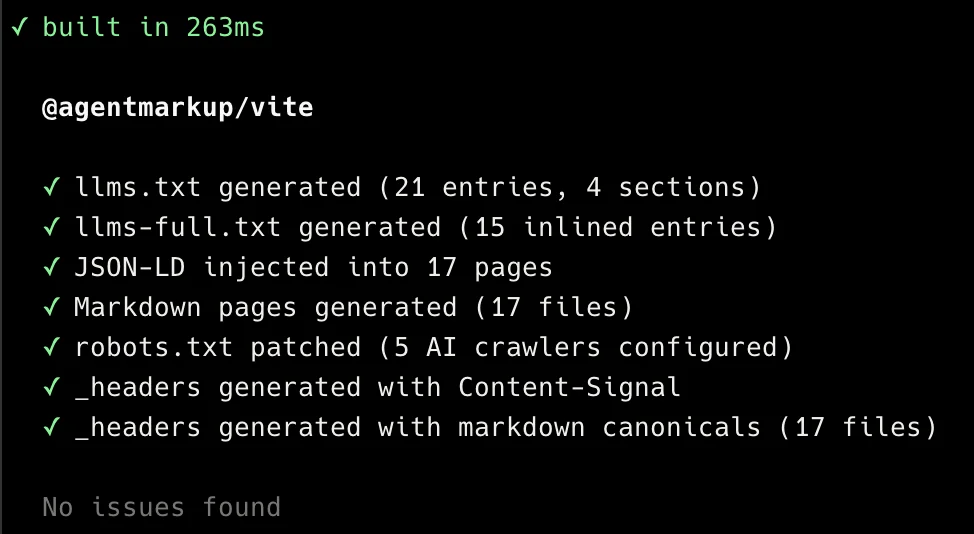
This is a recent build output from agentmarkup.dev with @agentmarkup/vite. The exact page and entry counts change as the docs site grows.
All packages
@agentmarkup/vite
Vite plugin. Works with React, Vue, Svelte, or plain HTML.
@agentmarkup/astro
Astro integration. Works with any Astro project.
@agentmarkup/core
Framework-agnostic generators and validators for custom build pipelines.
Use cases
E-commerce
Make your products visible in AI shopping recommendations. Product schema, llms.txt catalogs, and crawler access so ChatGPT and Perplexity can cite your store.
Brand awareness
Get your brand mentioned in AI conversations. Organization schema, FAQ markup, and clear positioning so AI systems accurately represent what you do.
Content websites
Power Google rich results and AI citations with Article, FAQ, and WebSite schemas. Build-time validation catches broken markup before it goes live.
Frequently asked questions
What does agentmarkup actually do?
It adds machine-readable build output: an llms.txt file, optional llms-full.txt context, the homepage llms.txt discovery link, <script type="application/ld+json"> tags with structured data, optional markdown mirrors for built pages, robots.txt rules for AI crawlers, and optional _headers entries with Content-Signal plus markdown-canonical directives. It also validates the final output and warns you about thin HTML, schema issues, broken markdown discovery, and crawler conflicts.
Does this improve my search rankings?
JSON-LD structured data is proven to power Google rich results (star ratings, FAQ dropdowns, product cards). llms.txt is a newer proposal and not yet consumed by all AI systems. agentmarkup does not promise rankings or traffic. It gives you the tools to make your site machine-readable.
Is llms.txt a standard?
It is a proposal from llmstxt.org, not an official standard. The format is simple, the cost of generating it is near zero, and the structured data features provide proven value regardless.
Is the config the same for Vite and Astro?
Yes. The configuration object is identical. The only difference is the import path (@agentmarkup/vite vs @agentmarkup/astro) and where you put it (plugins in Vite, integrations in Astro). Both adapters use the same core engine under the hood.
What is @agentmarkup/core for?
The core package contains the generators and validators without any framework binding. Use it if you have a custom build script, a prerender pipeline, or a framework we do not have an adapter for yet. The Vite and Astro packages use core internally.
Does it add any runtime JavaScript?
No. Everything happens at build time. The plugin runs during your Vite or Astro build and outputs static files. Zero JavaScript is shipped to the browser.
Do I need markdown mirrors on every page?
No. They are most useful when the raw HTML is thin, noisy, or heavily client-rendered. If your pages already serve substantial HTML, keep HTML as the primary fetch target and treat markdown mirrors as optional extra coverage.
Can I use my own JSON-LD schemas instead of presets?
Yes. Pass any object with an @type field. agentmarkup automatically adds the @context, escapes the output for XSS safety, and validates that the @type is present.
Will this break my existing robots.txt?
No. The plugin uses marker comments to identify its own section. It patches your existing robots.txt without touching your other rules. On every build, it updates only the section between the markers.